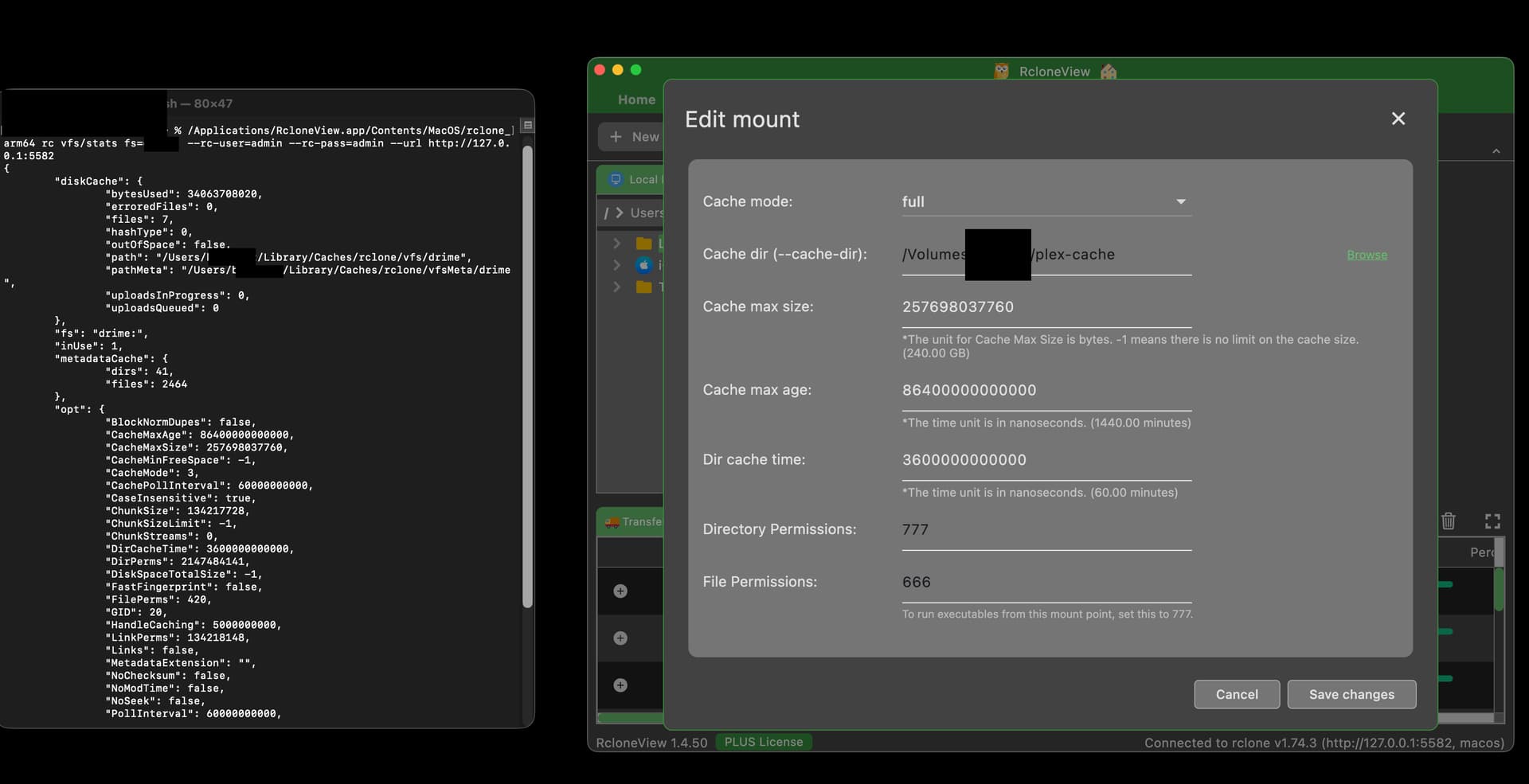
I am using version 1.4.50 for macos
as shown in the screenshot my cache directory is selected for another external drive but rclone information about my mounted drive shows an internal hdd cache directory and is not utilizing the correct path; similarly I have noticed issues with rclone global flags not being passed to rclone when queried through the terminal
when asking claude to help check if rclone global flags are being passed to the mount and compare this is what I get:
The mount is up but the VFS stats are still showing the old values — ReadAhead: 0, CacheMaxSize: 257GB, CacheMinFreeSpace: -1, NoChecksum: false. The daemon-level options are correct (we verified that), but the mount itself was created by RcloneView’s UI with its own hardcoded parameters that override the daemon defaults at mount time.
This confirms the core problem: RcloneView passes its own VFS parameters when creating the mount via RC API, which override whatever the daemon’s default settings are. The daemon knows about our flags, but RcloneView’s mount creation call explicitly sets its own values on top.
The flags I am trying to pass: –drime-upload-cutoff 1M --transfers 16 --checkers 16 --multi-thread-streams 0 --timeout 5m --contimeout 60s --retries 8 --drime-hard-delete --vfs-read-ahead 3G --vfs-read-chunk-size 256M --vfs-read-chunk-size-limit 2G --buffer-size 128M --vfs-cache-min-free-space 10G --vfs-fast-fingerprint --no-checksum --no-modtime --s3-chunk-size 128M --s3-upload-concurrency 8
versus what is shown for the actual mount once up:
Applications/RcloneView.app/Contents/MacOS/rclone_arm64 rc vfs/stats fs=’drive name’: --rc-user=admin --rc-pass=admin --url http://127.0.0.1:5582 2>&1 | grep -E ‘“ReadAhead”|“CacheMaxSize”|“CacheMaxAge”|“CacheMinFreeSpace”|“NoModTime”|“NoChecksum”|“CacheMode”’ localhost:/drive on /Users/drive (nfs, nodev, nosuid, mounted by bridgett) “CacheMaxAge”: 86400000000000, “CacheMaxSize”: 257698037760, “CacheMinFreeSpace”: -1, “CacheMode”: 3, “NoChecksum”: false, “NoModTime”: false, “ReadAhead”: 0,
Update - injecting global rclone flag for cache dir works but the GUI for advanced options for mount manager is not working; also none of the vfs rclone flags are passing through and are being ignored
1 Like
Hi @fubag,
Thanks for the detailed report — your vfs/stats comparison was spot on and pointed us straight at the root causes. There were actually three separate issues, and all of them are fixed in 1.4.60:
Download: https://downloads.bdrive.com/rclone_view/builds/RcloneView-1.4.61.dmg
What was wrong:
- Global VFS flags never reached rclone. The rclone RC daemon doesn’t accept --vfs-* / --no-checksum / --no-modtime flags on its command line — it fails to start, and RcloneView then silently restarted it without any of your global flags (which is also why --cache-dir seemed ignored until you injected it separately). RcloneView now detects VFS flags and applies them through the daemon’s options/set API instead, so they become daemon-wide defaults. If an invalid flag ever forces a fallback, the warning now tells you exactly which flags were dropped.
- Mounts overrode the daemon defaults — exactly what you diagnosed. RcloneView was passing a full snapshot of every VFS parameter with each mount, so daemon-level settings never applied. Now only the values you explicitly set in the mount dialog (cache mode, max size/age, etc.) are sent per mount; everything else (ReadAhead, NoChecksum, CacheMinFreeSpace, chunk sizes, …) inherits the daemon defaults from your global flags. Per-mount Custom Flags with --vfs-* options now apply to that specific mount too.
- Cache directory: it turns out rclone has no per-mount cache directory over the RC API — it accepts the option and silently ignores it, which is why the mount’s Advanced setting never worked. The cache directory is now where rclone actually supports it: Settings > Rclone > Cache Directory (with a folder picker). It applies to all mounts and needs an rclone restart after changing.
To test with your setup: put your flag list into Settings > Rclone > Global Rclone Flags, set your external drive path in Settings > Rclone > Cache Directory, restart rclone (button in Settings), then remount and re-run your same rc vfs/stats check — you should now see ReadAhead: 3221225472 (3G), NoChecksum: true, CacheMinFreeSpace: 10737418240 (10G), etc., with your mount-dialog values (cache mode full, max size) still honored, and cache files landing on the external drive. Quoted paths with spaces (e.g. --cache-dir “/Volumes/My Drive/cache”) also parse correctly now.
Please give it a try and let us know if anything still doesn’t stick.
1 Like
Thank you moving all global rclone flags from mount specific advanced settings to the new settings global location and selecting cache directory are now working great in 1.4.61 on macos
1 Like