pond
June 30, 2026, 12:23pm
1
Hi, I’m trying to sync from a Dropbox Enterprise Team folder to a Google Shared Drive, but always get the following error:
Message: Failed
Details: Directory not found
File: Dropbox:Work Archive/
I have correct permissions on both ends. I can perform the same sync via the Terminal, just not in the RcloneView app.
pond
June 30, 2026, 12:43pm
2
Also worth mentioning that Compare works for these two folder locations, just not copy or sync
Hi,
Thanks for the detailed report .
We found the cause: for Dropbox Business (Team) remotes, RcloneView was addressing the source against your personal namespace rather than the team space during copy/sync, which is why it couldn’t find the folder even though Compare (which uses a different code path) worked fine.
We’ve fixed this. Could you try the build below for your platform and let us know if the copy/sync now completes?
One note: we were able to verify this fix on a Dropbox Business plan, but not on an Enterprise plan, so the behavior may differ in your environment.
If the copy/sync still fails, could you help us with the following so we can dig deeper?
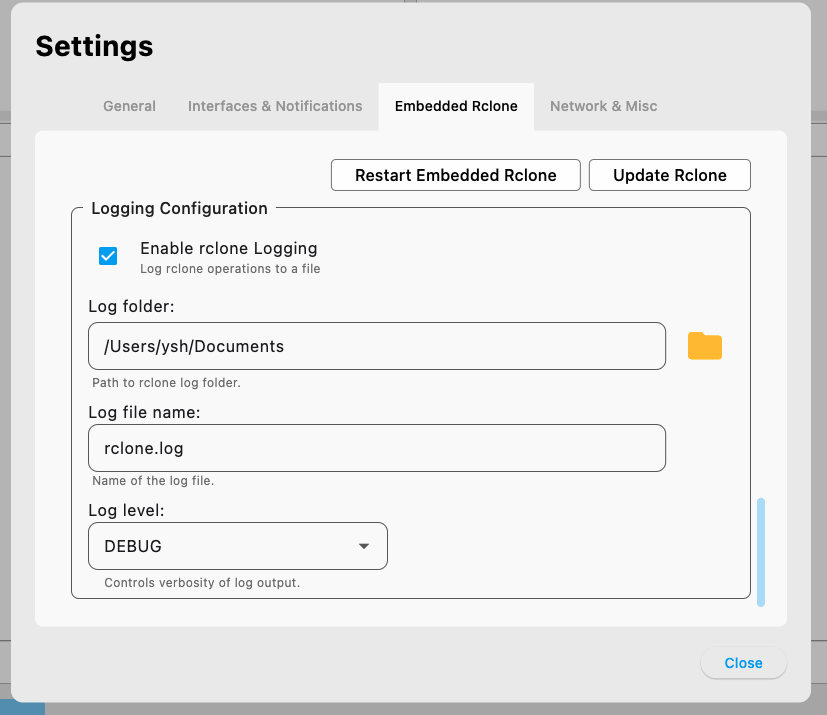
Enable logging as shown in the attached image.
Reproduce the copy/sync operation.
Send us the resulting log file.
It would also help a lot to know which Dropbox plan you’re on so we can reproduce it as closely as possible.
Thanks for your feedback!
pond
July 2, 2026, 9:08am
4
Thank you! I will try again
pond
July 2, 2026, 9:09am
5
We’re on Dropbox Enterprise
pond
July 2, 2026, 10:39am
6
It seems to be working now. I’ve had a couple of Network Error messages pop up, but it still seems to be syncing
1 Like