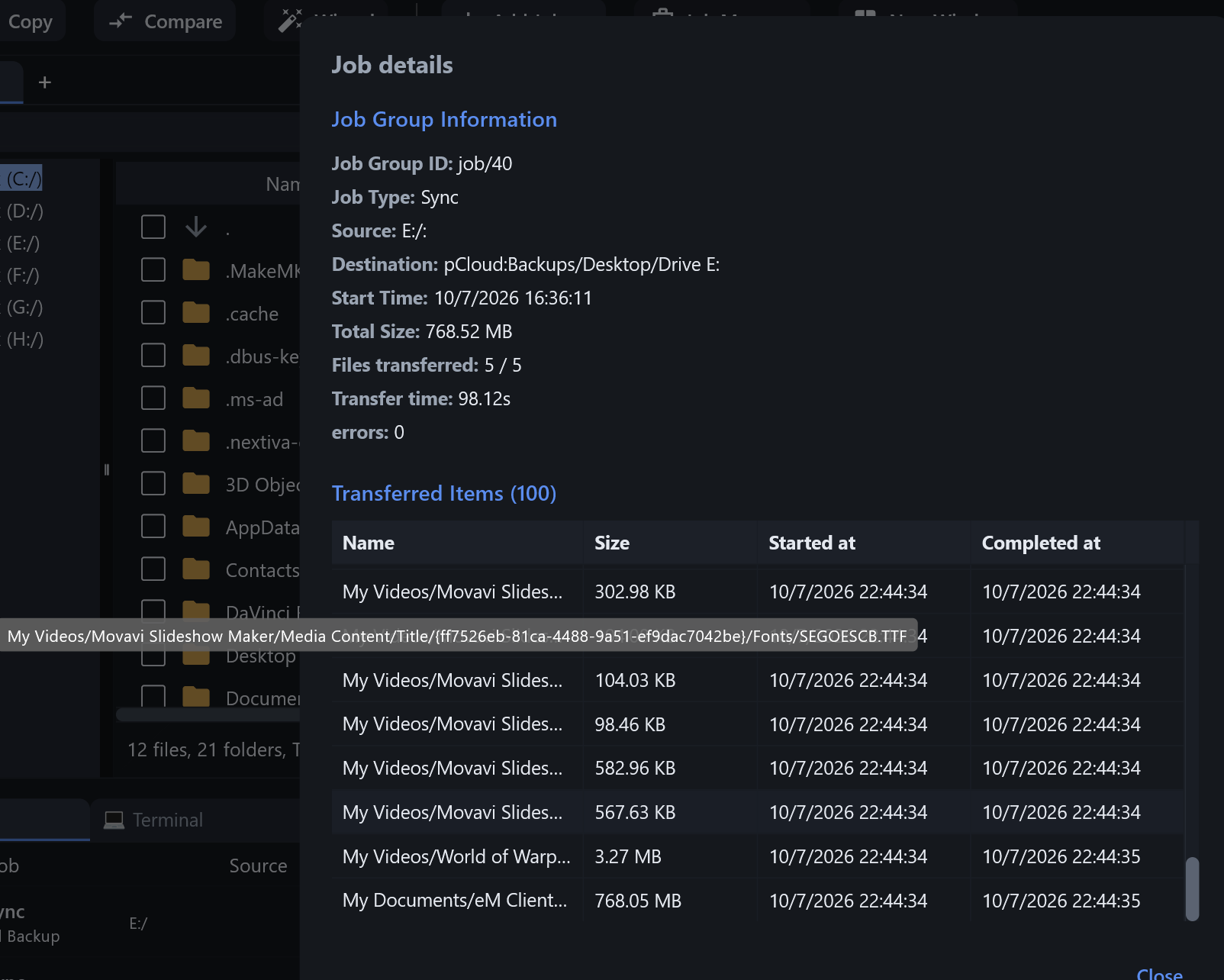
Thanks for the screenshot, it made this easy to track down. Short answer: your sync did the right thing, and the Files transferred: 5 / 5 line is correct. The list underneath is what’s misleading, and that’s a bug on our side.
What that list actually is
It isn’t only uploads. During a sync, rclone also records every file it compares and finds unchanged, and every file it deletes from the destination. It keeps only the last 100 of those entries. Up to 1.6.6, RcloneView shows all of them under “Transferred Items” without saying which is which. So the “(100)” is just that limit, not 100 uploads.
The Movavi files
Those are unchanged files that rclone checked, not uploaded. They’re most likely checked near the end of every run, so they always land in that last-100 window. Nothing was re-uploaded, which is why pCloud still shows the old date. The time in the list is when rclone checked the file. It has nothing to do with the {…} folder names.
Your new work files
They were uploaded (that’s the 5 / 5). They’re missing from the list because they finished earlier in the run and got pushed out of the 100 entries by all the checks that came after them.
World of Warplanes and eM Client
Those two are deletions. Sync removed them from pCloud because they’re no longer in the source. The eM Client one is almost certainly the old backup file: 768 MB can’t upload in one second, but it can be deleted in one. Your new eM Client backup is most likely one of the 5 uploads (it accounts for most of the 768.52 MB total).
The times
Up to 1.6.6, the Started at / Completed at columns are shown in UTC instead of your local time. That’s why they’re about six hours after the Start Time at the top. Also a bug.
The fix: 1.6.7 build for Windows
I’ve fixed this, and the fix is in a 1.6.7 build: https://downloads.bdrive.com/rclone_view/builds/setup_rclone_view-1.6.7.exe
It’s 1.6.6 plus this fix, so you can install it over 1.6.6. In that window:
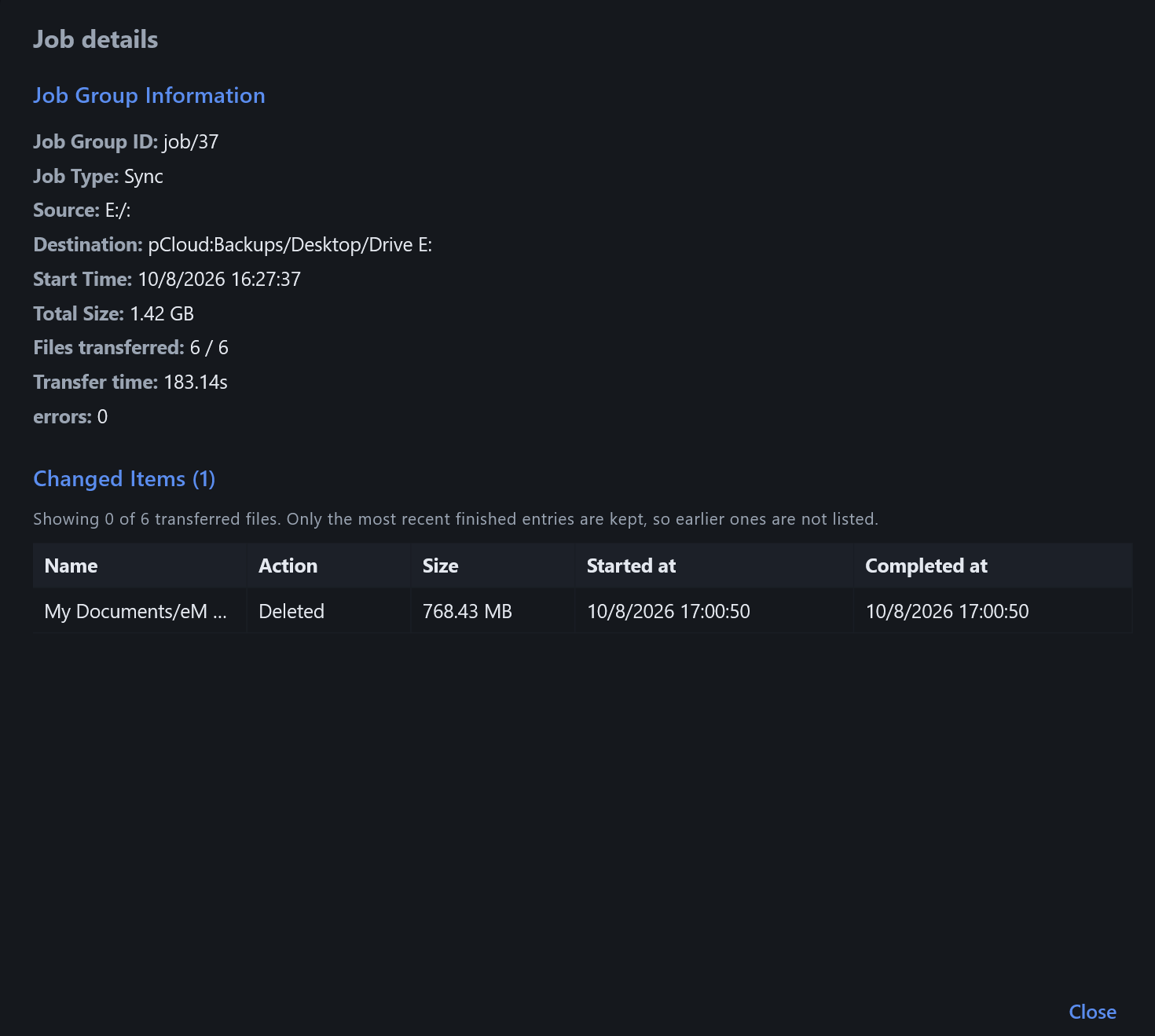
It lists only files that actually changed, under “Changed Items”, with an Action column: Transferred, Deleted, or Failed (Moved or Renamed when that happens). Files that rclone only checked and left alone are no longer listed.
RcloneView keeps the changes it sees (up to the latest 100) instead of letting later checks push them out.
rclone itself keeps only its latest ~100 entries, so on a very large sync a few uploads can still be gone before RcloneView reads them. When that happens, the window says so, e.g. “Showing 3 of 5 transferred files”.
Started at / Completed at are in your local time.
This applies to Jobs you run after updating. Runs from before the update were saved without this information, so their lists stay incomplete.
One important thing: once you’ve installed 1.6.7, please don’t go back to 1.6.6 or older. This version updates RcloneView’s local database, and an older version would reset it, which deletes your saved Jobs and Batch jobs, Job history, saved mounts and filter presets. Your remotes and settings aren’t affected.
Let me know how your next run looks.