Job manager window bug

There’s a bug on the latest release for macos where if the window isn’t full sized on macos and you open job manager then you can’t see all of the text or close the job manager window pop up unless you maximize and full screen the entire rcloneview window.

Please fix this.

Thank you for bringing this to our attention. We have a new version that fixes the issue where the Job Manager window text and close button were cut off on macOS.

Please download the updated build below to check if it resolves the problem for you:

Let us know if everything is working smoothly on your end!

Thanks it looks better now that you can close the window but the texts for the columns do not fit in the entire screen of the application still.

Are there plans for update checks within the macos application? How can I tell a new build is available to download and install?

Yes, we have them! However, to ensure system stability, we stagger the rollout and typically trigger the in-app notification a couple of days after a new version is released.
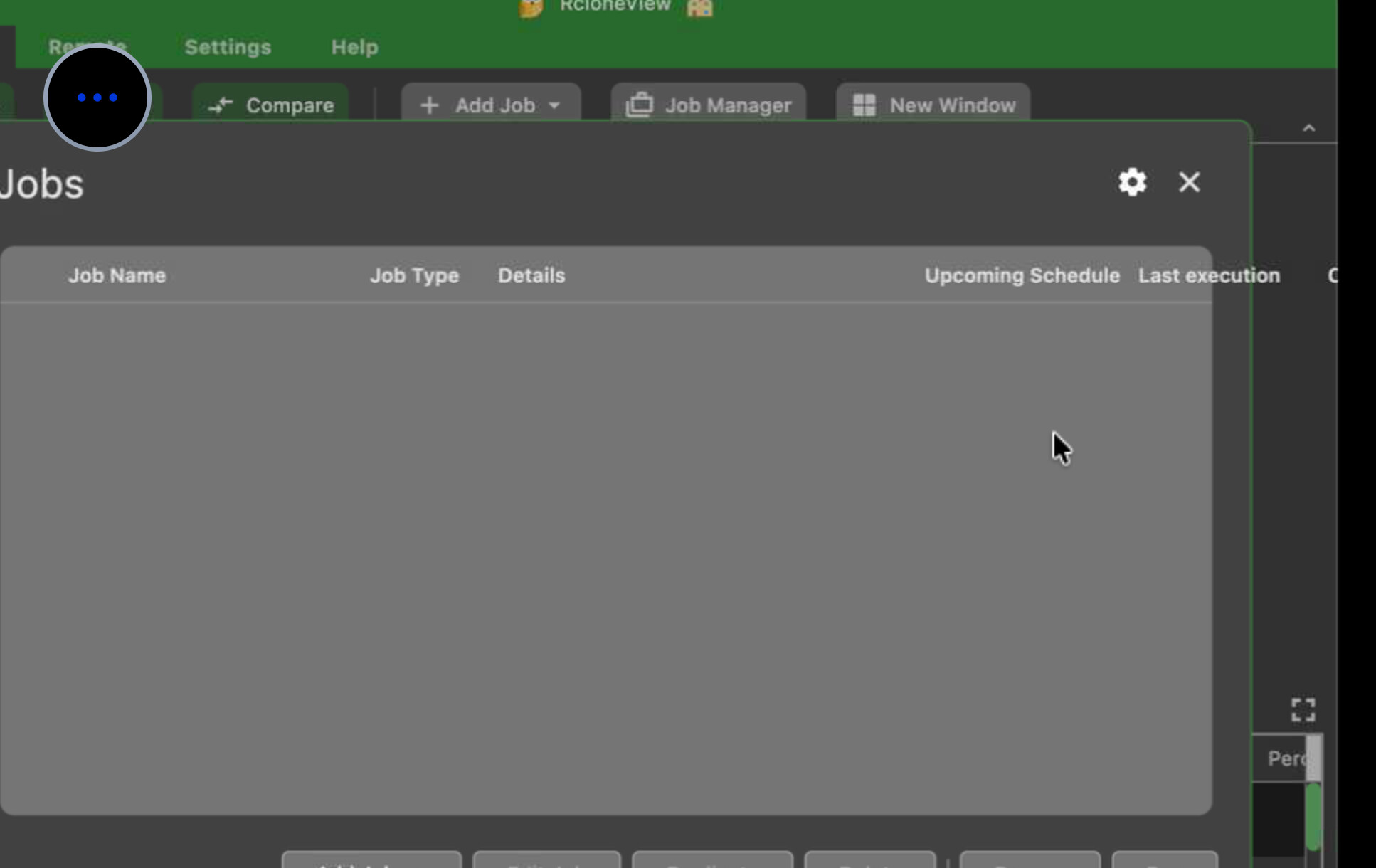
To help our team fix the column layout issue as quickly as possible, could you please share a screenshot of how it looks on your screen?

This is on 1.4.48 where you can see the text bleeding off the edge of the window when not full screen on macos

Thanks for the screenshot. The fix will be included in the following release.

1 Like

Thanks looking forward to the new release ; version 1.4.61 still has this bug in the UI