I recently updated my Windows 10 to the latest updates and downloaded the latest RcloneView and installed it, but when I launch it, I see it for a second and then it goes away…not running. I tried rebooting and same thing. Where can I look to see why it is bombing right away? I did have RcloneBrowser installed, but it isn’t running.
Please try the following version, which includes fixes for Windows 10 (clean install):
Download setup_rclone_view-0.8.401.exe
You can check the system event log for details. Since the application crashes immediately after launch, the application logs (normally accessible from the Settings > General screen) are not available.
I have removed the previous install and noticed it didn’t completely remove the Rcloneview directory and when I tried to remove it manually, I noticed that rclone.exe was still running and I had to kill it before the directory would get removed. I then installed .8.401 clean and experienced the exact same thing. I do see a windows firewall message come up and I select to allow both public and private, then it finished the install, then I select run and I just quickly see a window and then it disappers.
I have succcessfully installed this on my Windows 11 machine beautifully.
thx
I am trying to learn how to read the system event logs and it isn’t as easy as I thought. I don’t know where to find the RcloneView specific logs
After the application crashes, press Win + R, type eventvwr.msc, and press Enter.
In the Event Viewer window, go to Windows Logs → Application and look for entries related to RcloneView.exe.
Faulting application name: rclone_view.exe, version: 0.8.401.401, time stamp: 0x68a274d9
Faulting module name: unknown, version: 0.0.0.0, time stamp: 0x00000000
Exception code: 0xc0000005
Fault offset: 0x0000000000000000
Faulting process id: 0x7d48
Faulting application start time: 0x01dc124e406fe5a1
Faulting application path: C:\Program Files\RcloneView\rclone_view.exe
Faulting module path: unknown
Report Id: eb0f31ad-51f1-44a7-8791-52413cc8100f
Faulting package full name:
Faulting package-relative application ID:
From the details tab:
| - | System |
|---|
| - | Provider |
|---|
| [ Name] | Application Error |
|---|
| - | EventID | 1000 |
|---|
| [ Qualifiers] | 0 |
|---|
| Version | 0 |
|---|
| Level | 2 |
|---|
| Task | 100 |
|---|
| Opcode | 0 |
|---|
| Keywords | 0x80000000000000 |
|---|
| - | TimeCreated |
|---|
| [ SystemTime] | 2025-08-21T03:47:12.3904004Z |
|---|
| EventRecordID | 12080 |
|---|
| Correlation |
|---|
| - | Execution |
|---|
| [ ProcessID] | 0 |
|---|
| [ ThreadID] | 0 |
|---|
| Channel | Application |
|---|
| Computer | xxxxxx |
|---|
| Security |
|---|
| - | EventData |
|---|
| rclone_view.exe |
|---|
| 0.8.401.401 |
|---|
| 68a274d9 |
|---|
| unknown |
|---|
| 0.0.0.0 |
|---|
| 00000000 |
|---|
| c0000005 |
|---|
| 0000000000000000 |
|---|
| 7d48 |
|---|
| 01dc124e406fe5a1 |
|---|
| C:\Program Files\RcloneView\rclone_view.exe |
|---|
| unknown |
|---|
| eb0f31ad-51f1-44a7-8791-52413cc8100f |
|---|
It appears the application has crashed due to an access violation.
To help us analyze the issue, please send us the crash dump file.
Windows automatically generates dump files for most crashes. You can find them as follows:
- Press Win + R to open the Run dialog.
- Type %LOCALAPPDATA%\CrashDumps and press Enter.
- In the folder that opens, look for a
.dmpfile related to your application (for example,rclone_view.exe.[...].dmp).
What is real strange is I only have 2 entries in that directory and they both are from Apps I no longer have had on this system. I scanned my entire system just incase for a dmp file and there isn’t one.
We have integrated an application monitoring service (Sentry) into the following version of RcloneView.
Please install this version and run it so that we can capture any exceptions that occur.
How do I capture and send you the information?
Simply install and run the app to reproduce the crash. The event log will be automatically collected by the Sentry.io service.
I wanted to make sure I had all updates and a complete deep TotalAV scan completed, no virus found, download from your link, same issue. Your link says version…408, but it downloaded version …409. Not sure if you linked the correct file because nothing at all shows in the application log in the event viewer. One think I do notice is when I go to un-install rcloneview, it never uninstalls clean and I notice I have to kill the rclone.exe process first from task manager prior to uninstalling for it to uninstall clean.
I also tried turning off TotalAV service.. same thing.
We received the crash log from Sentry.io, and it indicates that the issue originates within Flutter, which we used to develop RcloneView.
We will continue analyzing the log and work on identifying potential solutions.
Thank you for your cooperation.
After investigating the crash logs, we suspect the problem is related to how the app handles graphics rendering, which might be affected by your system’s graphics drivers or compatibility with our current app build.To help resolve this:
- Please check and update your GPU drivers to the latest version available from your hardware manufacturer (e.g., NVIDIA, AMD, or Intel). This often fixes rendering-related issues.
- We’ll rebuild the app using the latest Flutter version 3.35 (our previous build used 3.32) to incorporate recent improvements. Once ready, we’ll share the download link with you shortly—please test it after updating your drivers.
If these steps don’t fix the problem, our next approach will be to disable Impeller, the Flutter’s modern graphics engine, and provide another build for you to try. We’re committed to getting this sorted for you—please reply if you have questions in the meantime.
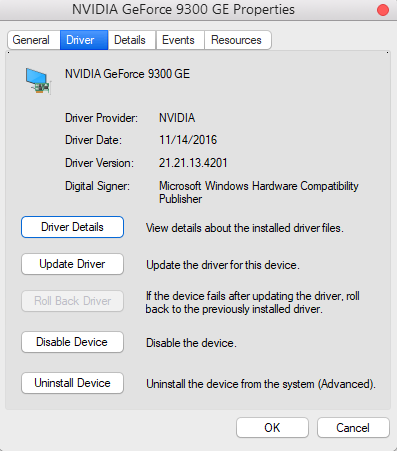
I wish this little Dell Optiplex 980 i7 was newer that it was, but according to what I am finding, I am running the latest version of the Nvidia GeForce 9300 GE driver for Windows 10…
A driver version 21.21.13.4201, released on November 19, 2016, is available for Windows Vista 64-bit, Windows 7 64-bit, Windows 8 64-bit, and Windows 8.1 64-bit. This version is also listed as compatible with Windows 10 and 11 64-bit
Hello,
Maybe my post of yesterday in “Suspected bug” describes a similar issue on Windows11 (Dell Precision M4800 with NVIDIA Quadro M2200 up to date). When I launch RcloneView, after some seconds, the content of the window dispear and I only have the border visible. I have to kill the process using tasks manager. It is especially a problem when I ask the application to run at login.
I use build 0.8.369.
Hello @f4ctz,
Thank you for the additional details. From what you describe, it looks like the issue you are experiencing on Windows 11 (build 0.8.369) may have the same root cause as the Windows 10 case we’re currently investigating. The symptoms are very similar — the application starts briefly and then the window content disappears or closes.
Thank you for your patience while we address the crash issue with RcloneView on your Windows machine.
After some research, we found that disabling the Impeller rendering engine is not supported on Windows. To address the crash you experienced, we’ve built a new version of RcloneView (0.8.414) built with the latest Flutter 3.35 engine, which includes updates and potential fixes for the Impeller rendering engine. Please download and install this version from the following link and test it:
Please try this version and let us know if the issue persists.
Hello,
I am VERY happy to say this now works!!! So happy :).
Thank you SO SO SO much for your incredible dedication and support to getting to working. For so long I think sooooo many have been waiting for for a great GUI for rclone, and your software so far is over the top good with features and ease of use. I will do my best to provide feedback to you. Thanks again.
1 Like