So RcloneView shows me at rclone v.169.3
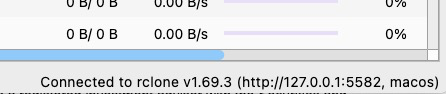
But if I go to the command line and issue an rclone “version” command, I get:
Not sure why … is there a way to force these in sync? I’m running Rcloneview 0.8.364 and I am testing a FileLu backend which requires rclone 1.70.x or above.
RcloneView includes rclone for user convenience. You can update the embedded rclone from the Settings → Connect Manager screen.
Click ‘Self Update’ to upgrade the embedded rclone. If the update fails for any reason, you can open a terminal and run the following command to upgrade manually:
/Applications/RcloneView.app/Contents/MacOS/rclone_arm64 selfupdate
Hope this helps
That did the trick. Curious, how often will rcloneview update the embedded version of rclone automatically?
The embedded rclone is currently updated only when a new version of RcloneView is installed.
We are planning to add a feature that notifies users when a new rclone version is available, without requiring a new RcloneView installation.
1 Like

