RcloneView 0.9 – Release Notes
Release Date: September 2025
Platforms: Windows, macOS, Linux
We’re excited to share RcloneView 0.9 with you! 
This release brings major enhancements in remote management, Synology NAS integration, theme customization, and file handling. It also includes a wide range of bug fixes, UX improvements, and compatibility updates for Flutter and Linux environments.
 Download RcloneView 0.9
 New Features
- Synology NAS Auto-Detection and Setup: Automatically detects and adds Synology NAS devices with default settings. A dialog appears when a Synology NAS is detected on startup.
- Cloud Drive Auto-Addition: Auto-adds linked local paths as drives such as iCloud, Dropbox, OneDrive, and Google Drive.
- Minimized Launch to Tray: Starts minimized to the system tray for a cleaner desktop.
 UI & UX Improvements
- Remote Configuration UX: More intuitive setup with improved dialogs and error handling.
- General Settings Redesign: Refined layout for easier navigation and clarity.
- Theme Color Fixes: Fixed missing checkbox theme application in settings.
- Show/Hide Password: Toggle visibility in rclone config password fields.
- File Selector Migration: Replaced
file_picker with file_selector for better compatibility.
- Global Option Validation: Detects and warns about invalid or conflicting rclone options.
- App Localization Fallbacks: Handles missing localization files in embedded rclone mode.
- Prevent Custom Filter Duplication: Avoids duplicate filters when editing jobs.
- Support Link Added: Help section now links to rcloneview.com/support.
- Disable File Actions During Compare: Buttons are disabled while comparison is running.
- Linux Tray Icon Fix: Tray icon now visible under various Linux themes and desktop environments.
 Security & Settings
- Config Encryption via Env Var: rclone config encryption key can now be set using environment variables.
- Improved Uninstaller (Windows): Properly terminates app processes and deletes files during uninstall.
- macOS License Persistence: License now correctly persists across reboots.
 Job & Transfer Improvements
- Optimized Mass Deletion: Large file deletions now run more efficiently in a single request.
- Auto-Close Tabs on Remote Deletion: Deleting a remote also closes any related open tabs.
- Job Double-Click Behavior: Now properly opens the linked remote in Explorer view.
 Bug Fixes
- Fixed issues with cmount on macOS (requires recent macFUSE update).
- [AWS S3] Incorrect Folder Deletion: Fixed issue where deleting one folder removed unrelated folders.
- [macOS] CLI Window Not Showing: Fixed terminal window not opening when adding new remotes.
- Invalid Global Options: App now recovers from startup failures caused by invalid rclone flags.
- “Too Many Open Files” Alert: Warns when system file handle limits are exceeded.
- Incorrect File Count: Transfer file counts now display correctly.
- Touchpad Selection Bug (macOS): Prevents two-finger scrolling from selecting files.
- Improved Drag-to-Select: More accurate file selection using mouse drag.
- Language Persistence: App now launches in the correct saved language.
- Embedded rclone Update Freeze: Fixed freezing during rclone binary update in embedded mode.
 Technical & Build
- Flutter 3.25 Upgrade: Upgraded to the latest Flutter version for better performance and compatibility.
- macOS Entitlement Fixes: Added missing permissions required for file access and system dialogs.
 Notice on Licensing
RcloneView is free for most daily use cases. Features such as multi-window support, job scheduling, and advanced management options are available to paid users. Your support helps us continue improving RcloneView for everyone. 
We truly appreciate your feedback and support—it helps us make each release better than the last. If you have suggestions or run into any issues, please let us know.
Thank you for being part of the RcloneView community, and happy syncing! 
— The RcloneView Team
1 Like
Hi guys. Updated and cmount stopped working on MacOS 15.6.1. nfsmount is so slower and unstable that it’s almost impossible to use, giving a lot of freezes to Finder.
Thanks for reporting this. We’ll check into the cmount issue on macOS 15.6.1 and get back to you as soon as possible.
Based on the log, it’s not finding FUSE.
2025/09/03 09:19:54 NOTICE: unmount FAILED: failed to umount FUSE fs: accept tcp 127.0.0.1:51335: use of closed network connection
2025/09/03 09:20:47 NOTICE: mount FAILED: failed to mount FUSE fs: mount stopped before calling Init: mount failed: cgofuse: cannot find FUSE
2025/09/03 09:20:47 ERROR : rc: "mount/mount": error: failed to mount FUSE fs: mount stopped before calling Init: mount failed: cgofuse: cannot find FUSE
A bit more info:
If I change the local rclone location to the one installed via homebrew, Google Drive works fine with cmount.
WebDAV still doesn’t work.
Also, if Fuse-T isn’t installed, only MacFuse, RCloneView doesn’t recognize the latter.
I can still mount the WebDAV with cmount manually using the CLI, without RCloneView.
The issue you reported has been fixed in this version. You can now mount using cmount on macOS.
Please make sure to quit both RcloneView and rclone completely before installing.
Download the new version here:
https://downloads.bdrive.com/rclone_view/builds/RcloneView-0.9.440.dmg
If you encounter any further issues, feel free to reply back!
Hi guys, thanks for the return, but nothing changed, RCloneView still can’t detect MacFUSE even though I manually made a full uninstallation and reinstallation of RCloneView.
RCloneView version 0.9440
macFUSE version: 4.10.2
From the log:
[error] | 23:34:27 507ms | body: {
	"error": "failed to mount FUSE fs: mount stopped before calling Init: mount failed",
	"input": {
		"fs": "remote_photos:/",
		"mountOpt": {
			"AllowNonEmpty": true,
			"AllowOther": false,
			"VolumeName": "RemotePhotos"
		},
		"mountPoint": "/Users/user/remote_photos",
		"mountType": "cmount",
		"vfsOpt": {
			"CacheMaxAge": 3600,
			"CacheMaxSize": 1073741824,
			"CacheMode": "writes",
			"DirCacheTime": 60,
			"DirPerms": 511,
			"FilePerms": 438,
			"ReadOnly": false
		}
	},
	"path": "mount/mount",
	"status": 500
}

[error] | 23:34:27 507ms | Failed to mount/mount. Status Code: 500

[error] | 23:34:02 981ms | Failed to fetch about for x15c_fotos-ts. Status Code: 500, Response: Internal Server Error
But running the embedded rclone manuall via CLI works fine:
After the clean reinstallation of RCloneView, it now can’t even mount GoogleDrive. 
That’s unusual. In our test systems, we’re able to mount with cmount using RcloneView 0.9.440 together with macFUSE 4.10.2. We verified this on three different MacBooks.
Could you please run the following command in Terminal and share the output with us?
/usr/bin/codesign -dvv --entitlements :- /Applications/RcloneView.app/Contents/MacOS/rclone_arm64
❯ /usr/bin/codesign -dvv --entitlements :- /Applications/RcloneView.app/Contents/MacOS/rclone_arm64
Executable=/Applications/RcloneView.app/Contents/MacOS/rclone_arm64
Identifier=rclone_arm64
Format=Mach-O thin (arm64)
CodeDirectory v=20500 size=563960 flags=0x10000(runtime) hashes=17613+7 location=embedded
Signature size=8993
Authority=Developer ID Application: Bdrive Inc. (4M7G2HXTMV)
Authority=Developer ID Certification Authority
Authority=Apple Root CA
Timestamp=5 Sep 2025 at 01:11:58
Info.plist=not bound
TeamIdentifier=4M7G2HXTMV
Runtime Version=15.5.0
Sealed Resources=none
Internal requirements count=1 size=172
warning: Specifying ':' in the path is deprecated and will not work in a future release
<?xml version="1.0" encoding="UTF-8"?><!DOCTYPE plist PUBLIC "-//Apple//DTD PLIST 1.0//EN" "https://www.apple.com/DTDs/PropertyList-1.0.dtd"><plist version="1.0"><dict><key>com.apple.security.cs.disable-library-validation</key><true/></dict></plist>
Thank you for sharing the codesign output. Everything looks normal, and in particular, the last line confirms that the entitlement to disable library validation is present, which should address the issue of not being able to load libraries.
Since mounting still fails despite this, it seems the problem lies elsewhere. At the moment, we don’t have a clear idea of the cause. We’ll continue investigating to better understand what might be happening.
Thanks for looking into it.
I use a Google Drive mount with cmount and automount ON when starting RcloneView.
I decided to disable the automount, and on the next run, I could mount the WebDAV with cmount.
TL-DR: MacFUSE somehow is only accepting one cmount.
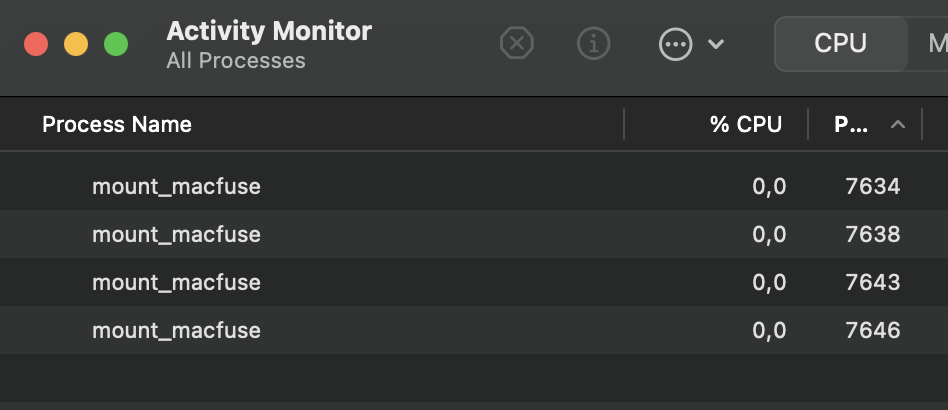
Every time I try a cmount, and it fails, it spawns a zombie mount_macfuse process:
If I unmount the successful cmount with all these mount_macfuse zombie processes open, RcloneView becomes highly unstable and slow, and any attempt to a cmount fails (also spawning a new mount_macfuse process).
Quitting or force quitting all mount_macfuse processes makes RcloneView snappy again, and also restores the possibility of doing one cmount.
Thank you for the detailed information—it’s very helpful. 
From what you’ve described, it seems like macFUSE is only allowing a single active cmount, and failed attempts are leaving behind zombie mount_macfuse processes that affect stability. We’ll check into this further using the details you’ve provided to better understand what’s happening.
Thanks again for taking the time to document your experience—it makes troubleshooting much easier.
1 Like
Hi guys, a few more hints…
I’m having the same issue if running a separate Rclone instance with RcloneView closed.
That sums up to be something related to Rclone and MacFUSE themselves.
Just in case, here goes a piece of the log:
2025/09/09 22:50:59 DEBUG : rc: "mount/mount": with parameters map[fs:fotos: mountOpt:map[NoAppleXattr:true VolumeName:fotos] mountPoint:/Users/user/fotos mountType: vfsOpt:map[]]
2025/09/09 22:50:59 DEBUG : webdav root '': Reusing VFS from active cache
2025/09/09 22:50:59 DEBUG : Mounting on "/Users/user/fotos" ("fotos")
2025/09/09 22:50:59 DEBUG : webdav root '': Mounting with options: ["-o" "attr_timeout=1" "-o" "fsname=fotos:" "-o" "subtype=rclone" "-o" "max_readahead=131072" "-o" "atomic_o_trunc" "-o" "daemon_timeout=600" "-o" "volname=fotos" "-o" "noappledouble" "-o" "noapplexattr"]
2025/09/09 22:50:59 DEBUG : rc: "mount/listmounts": with parameters map[]
fuse: cannot register signal source
2025/09/09 22:51:00 ERROR : webdav root '': Mount failed
2025/09/09 22:51:00 NOTICE: mount FAILED: failed to mount FUSE fs: mount stopped before calling Init: mount failed
2025/09/09 22:51:00 ERROR : rc: "mount/mount": error: failed to mount FUSE fs: mount stopped before calling Init: mount failed
The workaround solution for me was to add a local Rclone instance as an Apple Shortcut, and when I need to connect to this machine, run it and manage through RcloneView - would be nice if we could choose different accent colors to easily identify which instance the app is connected to.
(Also, would be good to have the “noapplexattr” option to the mount dialog, will ask for it as a separate feature)